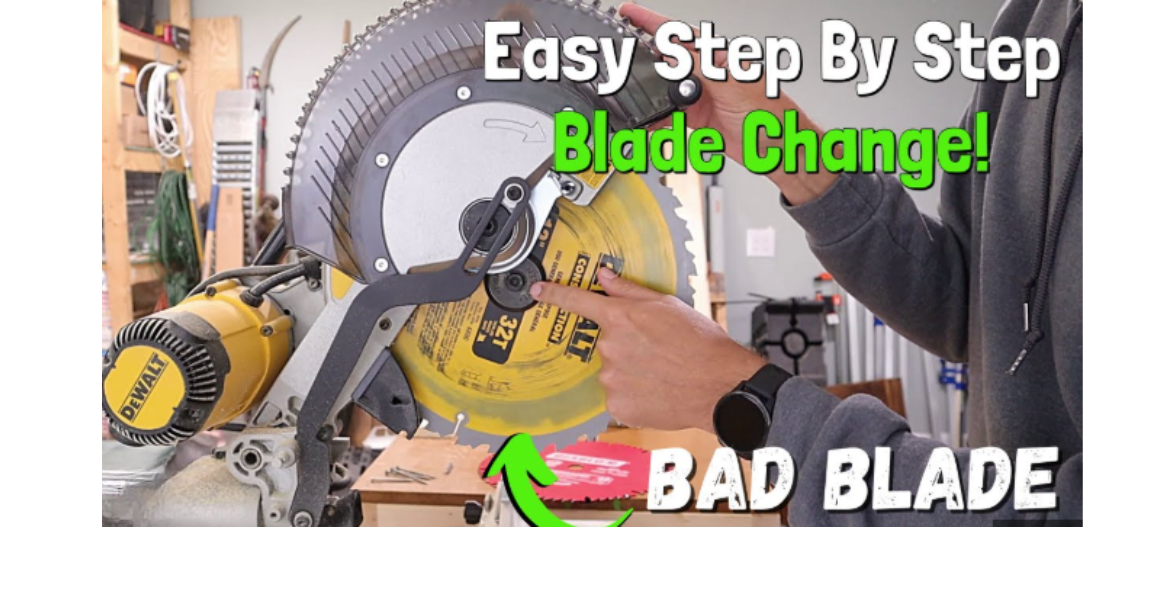
How to Change the Blade on a DeWalt Miter Saw?
A DeWalt miter saw cuts wood with sharp accuracy. A clean blade gives smooth cuts. A dull blade creates burn marks, rough edges, and slow progress. A blade change becomes important after long use.
Many people feel nervous during the first blade change. The blade looks sharp. The parts look complex. The lock button, the guard, the screw, the washer. Each part plays a clear role, and the process feels scary at first.
The truth feels much simpler. A miter saw follows a clear pattern. One screw holds the blade. One button locks the blade from spinning. One guard moves out of the way. That is all. So a little patience creates a safe and simple blade change.
This guide explains the full process in an easy and friendly way. Every step uses short sentences. Every tip uses simple vocabulary. The goal stays focused on helping beginners and non-native readers.
No advanced terms. No confusing instructions. Just a clear and natural walkthrough. This guide includes reasons, steps, safety advice, and troubleshooting. Everything stays simple, detailed, and practical.
Why a DeWalt Miter Saw Needs a Blade Change
A blade dulls with time. Hard wood, nails, plywood glue, and long cutting sessions affect the sharp edge. A dull blade slows down the saw. It strains the motor. It damages the workpiece.
Signs You Need a New Blade
A dull blade gives clear signs. These signs appear slowly, then become consistent.
Common signs include:
-
Burn marks on wood
-
Rough edges after cuts
-
Extra pressure during cutting
-
Smoke near the blade
-
Loud noise
-
Slow progress through wood
-
Sawdust turning fine like powder instead of chips
Each sign points to a weak blade. Fresh blades give clean results with less effort.
Benefits of a Fresh Blade
A new blade improves everything. The cut feels smoother. The saw feels stronger. The motor works with less stress. Accuracy improves on trim, molding, and frames.
Benefits include:
-
Cleaner finish
-
Straighter lines
-
Faster cuts
-
Less heat
-
Longer motor life
A blade change keeps your DeWalt miter saw healthy.
What You Need Before You Start
A quick setup makes the task smoother. Gather these items first.
Tools and Items You Need
-
A wrench (most DeWalt miter saws include one)
-
A clean cloth
-
A new blade (same size as the original)
-
Safety glasses
-
A pair of work gloves
Why Safety Gear Matters
Your hands stay close to the blade during this task. That alone makes gloves important. Thick gloves give you a strong grip. They add a layer of protection from sharp edges. Safety glasses protect your eyes from dust or small metal flakes. You never want to skip safety gear. It takes only a moment to wear, and it protects you from mistakes.
Step By Step Process
Prepare the Saw
A safe workspace keeps the job simple. Let’s walk through the setup.
Unplug the Saw
Electric tools must stay fully off for blade changes. Pull the plug from the outlet. Place the cord aside so you see it clearly. A clear power cut removes all risk of accidental starts. Never trust only the power switch. Always unplug.
Set the Saw on a Stable Surface
A wobbling miter saw can cause slips while removing the blade bolt. Set it on a strong workbench or a flat floor. A steady base keeps the saw from shifting. It also keeps you from leaning in awkward angles.
Move the Blade Guard Up
Every DeWalt miter saw has a blade guard. Push it upward slowly. This exposes the bolt and the blade. Keep your fingers clear of the edge. Even a dull blade can cut skin.
Find and Use the Spindle Lock
The spindle lock holds the blade still. Without it, the blade will spin each time you try to loosen the bolt. That makes removal almost impossible.
How to Locate the Spindle Lock
It sits near the blade, usually behind a small button or lever. Most DeWalt models place it on the right side.
How to Use It
Press and hold it firmly. Rotate the blade slowly by hand until you feel the lock drop into place. Once it locks, the blade stops moving. You can now loosen the bolt.
Remove the Old Blade
This part takes patience. You are now close to sharp metal, so stay careful.
Loosen the Bolt
The blade bolt turns clockwise to loosen on DeWalt saws. This can feel strange since most bolts loosen counterclockwise. Turn the wrench slowly. Keep the spindle lock pressed. The bolt will break free with steady pressure.
Remove the Outer Washer
After the bolt comes out, you will see a washer. This round metal piece holds the blade tight. Slide it off carefully and place it somewhere safe.
Lift the Blade Out
Hold the blade by its sides. Do not touch the teeth. Lift it straight out. Move slow so you don’t scrape your gloves. Place the blade on a flat surface.
Clean the Arbor Area
The arbor holds the blade. Dust collects here over time.
Why Cleaning Helps
Dust and sap create a thin film. This film adds friction. The blade may wobble if dirt stacks too high. A clean arbor ensures the blade seats perfectly.
How to Clean
Use a dry cloth. Wipe the arbor and surrounding metal. Scrub lightly until the surface looks clear. Do not use oil, grease, or liquid cleaners. These cause slipping and reduce grip.
Choose the Right Replacement Blade
A good blade improves cut quality. Before installing one, understand what makes a blade suitable.
Blade Size
Most DeWalt miter saws use:
-
10-inch blades
-
12-inch blades
Match the size printed on your saw. Never use a blade that does not match the original diameter.
Tooth Count
Different tooth counts affect the cut:
24–40 Teeth
-
Fast cuts
-
Great for rough lumber
-
Best for framing or outdoor work
60–80 Teeth
-
Smooth cuts
-
Ideal for trim, molding, or furniture pieces
100+ Teeth
-
Ultra-fine finish
-
Slow but clean cuts
Blade Material
Carbide-tipped blades stay sharp longer. Standard steel blades wear out fast. Carbide blades cost more, but the longer life makes them a smart choice.
Install the New Blade
You now place the new blade on the arbor. This step must be exact.
Check the Rotation Arrow
Every blade has a small arrow. Match this arrow with the rotation direction marked on your saw. If the arrow faces the wrong way, the saw will cut poorly and may chip wood.
Place the Blade on the Arbor
Hold the blade by the center hole. Lower it gently onto the arbor. Make sure it sits flat and snug.
Reinstall the Washer
Slide the washer back on. It should lay flat against the blade.
Insert and Tighten the Bolt
Use your wrench again. Hold the spindle lock. Turn the bolt counterclockwise to tighten. Use firm pressure. Do not over-tighten. A strong, steady twist is enough.
Lower the Blade Guard
Slide the guard back into place. It must cover the blade before you plug the saw in. A working guard keeps your hands safe during use.
Test the Saw
Plug the saw back in. Keep your hands far from the blade.
Run the Saw for a Few Seconds
Let the blade spin freely for five to ten seconds. Listen for scraping sounds. Watch for wobbling. A smooth spin means the blade sits correctly.
Make a Test Cut
Pick a scrap piece of wood. Place it against the fence. Lower the saw and cut slowly. Feel the cut. A clean and smooth motion confirms correct installation.
Extra Tips for Blade Care
A few habits keep your blade sharp longer.
Keep Lumber Clean
Dirt and small stones damage teeth. Brush your lumber before cutting.
Avoid Forcing the Saw
A blade lasts longer with gentle pressure. Let the motor do the work.
Store Spare Blades Carefully
Wrap them in cloth or store them in their original cases. Stacked blades dull each other.
Sharpen When Needed
A carbide blade can be sharpened several times. A sharpening service can renew dull edges at low cost.
Common Mistakes to Avoid
These errors can damage the blade or the saw.
Over-tightening the Bolt
Too much force can strip threads. Use firm but natural strength.
Touching the Teeth with Bare Fingers
Even new blades can cut skin. Always wear gloves.
Installing the Blade Backwards
This leads to rough cuts and burning. The arrow always shows the right direction.
Leaving Dust on the Arbor
A small amount of dust can create wobble. Wipe everything clean.
Skipping the Test Run
The dry spin helps you catch alignment issues early.
FAQs
1. How often should I change the blade on a DeWalt miter saw?
Most blades last several months for casual users. If you use the saw daily, the blade may need a swap every few weeks. Signs include burning marks, slow cuts, and rough edges.
2. Can I sharpen a dull DeWalt miter saw blade?
Carbide-tipped blades can be sharpened many times. Steel blades wear fast and do not sharpen well. Sharpening is cheaper than buying a new carbide blade.
3. What size blade fits my DeWalt miter saw?
Most DeWalt saws use either a 10-inch or 12-inch blade. The size appears on the label near the guard. Match the size exactly.
4. Why does the bolt loosen clockwise?
DeWalt uses a reverse thread. This design keeps the bolt from loosening while the blade spins. It is normal and safe.
5. Why does my blade wobble after installation?
The arbor may have dust. The washer may sit crooked. The bolt may need a slight tightening. Remove the blade and reinstall it carefully.
6. Can I replace the blade without work gloves?
Gloves add safety. The blade edges are sharp. Even a slight brush can cut skin. Gloves also give you a firmer grip.
Conclusion
A blade change on a DeWalt miter saw stays simple once you understand each step. The process has no complicated parts. You unplug the saw. You open the guard. You lock the spindle. You remove the bolt.
You swap the blade. You tighten it again. The steps stay steady and clear. A fresh blade improves speed. It improves accuracy. It keeps cuts clean and smooth. It also reduces strain on the motor.
A few minutes of work brings a big difference to every project. Use this guide every time you install a new blade. Your cuts will stay sharp. Your saw will feel strong. Your work will look better with less effort.